
An imaging practice may already have a well-established workflow for reading chest CT examinations, assessing pulmonary nodules, authorising reports and delivering results to referring clinicians. Introducing the National Lung Cancer Screening Program (NLCSP) does not necessarily mean that workflow needs to be redesigned.
The additional challenge is collecting and communicating the information required by the National Cancer Screening Register (NCSR). The program requires a structured clinical radiology report and electronic submission to the register. RANZCR provides the reporting template and clinical guidance, and the NCSR supports integrated software and its Healthcare Provider Portal as reporting pathways.
For practices moving away from manual submission, it is worth looking beyond the method of transmission. Where does the required information come from? Who resolves a missing field? Can the clinical report continue independently of a registry issue? And how do we preserve the quality of the report the referring clinician actually receives?
The radiology report is a professional communication
Structured reporting is not new to radiology, but it can mean quite different things. A radiologist using a standard text template in a voice recognition system may already be producing a structured report in one sense. Capturing discrete, coded findings that can be exchanged between systems is another. RANZCR recognises both templated reports and dedicated structured reporting software in its discussion of structured reporting.
For the NLCSP, the registry requires information in a form that supports consistent recording and follow-up. That information is essential, but the way it is represented for electronic exchange is not necessarily the most natural way to communicate it to a referring clinician.
The radiology report is a significant part of an imaging practice’s relationship with its referrers. Its clarity, language, organisation and presentation reflect the professional judgement of the radiologist and the character of the practice. A referrer needs to understand the clinically relevant findings, the assessment and what should happen next.
From the outset of developing Healthinc Forms for lung cancer screening, we recognised the need to preserve that distinction. We designed the platform to produce different representations of a common set of report data.
A clinical report can use the practice’s preferred presentation and report-authoring environment. The registry receives the structured information it requires. Both must retain the clinical meaning of the radiologist’s interpretation, including the applicable NLCSP report content, prescribed terminology and management recommendations. Customisation of presentation is not a licence to omit required clinical information or change guideline-defined recommendations.
One interpretation, two reporting pathways
The reporting architecture can separate the presentation of a report from the underlying clinical data. This makes it possible to generate the appropriate output for each destination without asking a radiologist to independently author the same findings twice.
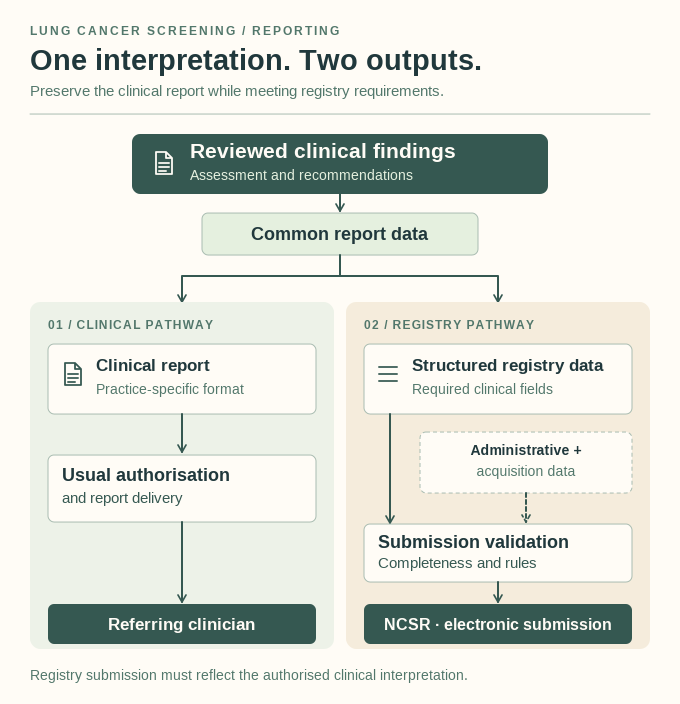
Illustrative architecture. The location of clinical authorisation and the timing of output generation depend on the practice’s integration design. Registry submission must reflect the authorised clinical interpretation.
Where a practice already has a source of structured findings, those findings can be received from that system. Where information is captured in Healthinc Forms, the platform can generate clinical report content for the existing RIS, PACS or report-authoring system. The practice can retain its preferred authorisation pathway.
This is particularly useful where the reporting system already applies its own demographics, letterhead, signatures and distribution rules. The integration may need to supply the clinical report content rather than generate a complete replacement document.
Reuse information already held within the practice
Much of the information needed for registry submission is captured during the course of a normal imaging examination. The issue is often that it is held across several systems.
| Information needed | Potential source |
|---|---|
| Patient identity and Medicare details | RIS or practice administration system; HL7 patient and order messages |
| Examination identifiers and referral context | RIS; HL7 order messages |
| CT acquisition and radiation dose information | DICOM Radiation Dose Structured Report (RDSR), where available from the modality or PACS |
| Pulmonary nodule findings and measurements | Supported lung-reading or computer-aided detection (CAD) system |
| Screening assessment, additional findings and recommendations | Reviewed structured clinical report or other supported reporting source |
These are possible integration sources, not a guarantee that every practice has every required field available electronically.
An integration can make use of HL7 messages already exchanged between a radiology information system (RIS) and a picture archiving and communication system (PACS), rather than requiring the same information to be entered again. Similarly, a CT dose report already stored in PACS may be a useful source of acquisition information.
The mapping needs to establish which system is authoritative for each value, how updates are handled and how the information is associated with the correct patient and examination. A missing or conflicting value should be identified and resolved, not guessed.
A missing Medicare number should not interrupt a radiologist
Consider an examination for which the clinical interpretation is complete but a registry-required patient identifier is missing.
The radiologist may have everything needed to complete the clinical report. Asking them to locate an administrative identifier adds an interruption without improving the clinical interpretation. The administrative team is generally better placed to resolve that issue.
A missing acquisition or dose record may instead need the attention of the CT team, while an inconsistent clinical assessment or recommendation requires clinical review.
Each exception should reach the people able to resolve it.
Where clinically appropriate and consistent with the practice’s reporting policy, the authorised clinical report can continue through its usual delivery pathway while the outstanding registry-specific information is resolved. The registry submission remains pending, visible and assigned for follow-up; it must not be lost simply because the clinical report has been delivered.
| Example exception | Appropriate handling |
|---|---|
| Required Medicare detail is missing | Reconcile available administrative data; refer unresolved information to administration |
| CT dose report is unavailable | Attempt retrieval and examination matching; refer unresolved acquisition issues to the CT team |
| Screening category and recommendation disagree | Refer the discrepancy to the responsible clinical user for review |
| Registry connection is temporarily unavailable | Retain submission state, monitor the failure and retry according to the integration’s recovery policy |
This separation of responsibilities is an important part of designing a screening workflow, particularly where reporting radiologists work remotely or across multiple sites.
Submission is a process, not just a message
Replacing a fax with an electronic message solves only part of the problem. An imaging organisation also needs to know whether the correct information has been assembled, whether it satisfies the destination’s requirements and whether the submission has been accepted.
A reliable integration needs to account for mandatory and conditionally required fields, value formats, patient and examination matching, and the consistency of the screening assessment and recommendation. For example, a category 2 assessment should not inadvertently be paired with a recommendation intended for category 1. The relevant rules must follow the applicable Australian NLCSP protocol; validation should identify discrepancies for review rather than silently change a clinical decision.
A temporary communication failure and a rejected dataset need different responses. Retrying an unchanged message may help in the former case, but not in the latter. Acknowledgements, submission status and controlled retries help avoid unnecessary duplicate transmissions and make outstanding work visible.
Corrections need similar care. If an authorised clinical finding changes, the appropriate clinical addendum and registry correction pathways need to be coordinated. A change confined to registry administration should not automatically generate another clinical report for the referrer.
Choosing the right level of integration
Different imaging organisations have different starting points. The most suitable integration is determined by the information available and the workflow the practice wants to retain.
1. Registry submission as a background service
Where existing reading and reporting systems already produce suitable structured information, Healthinc Forms can be used primarily as the integration layer at the end of the process. It can receive that information, obtain other required data from connected systems, validate and transform it, and manage delivery to the NCSR.
The day-to-day reading workflow may need very little change. Any new interaction can be concentrated on exceptions that cannot be resolved automatically.
2. A RIS or PACS-driven reporting workflow
Many radiologists begin their work in a RIS or PACS worklist. That familiar starting point can be retained while supported applications are launched in the context of the selected examination.
A configured single-click integration can open the relevant lung-reading application, diagnostic viewer and structured reporting environment as appropriate. Results can be returned through supported interfaces, reducing the need to search for the same examination in multiple systems or manually transfer findings.
This approach does not prescribe a particular CAD, PACS or voice recognition vendor. The available launch mechanisms and data interfaces need to be assessed for each combination of systems.
3. A dedicated lung screening worklist
Where a practice prefers to manage screening examinations separately, the NLCSP workflow in Healthinc Forms can provide its own worklist and coordinate the launch of connected reading, viewing and reporting applications.
The worklist provides another starting point for the same examination rather than requiring all clinical information to be managed within a single application. Existing systems can continue to perform their established roles.
What to establish before implementing the integration
A useful starting point for a technical discovery session is to follow one screening examination from booking through to registry acceptance:
- Identify the worklist and application from which the radiologist normally starts reporting.
- Establish where clinical findings are captured and where the report is authorised.
- Determine which structured data, identifiers, dose records and clinical results are already available from connected systems.
- Agree how the clinical report will be presented to referrers and how mandatory NLCSP content will be preserved.
- Assign responsibility for administrative, acquisition, clinical and transmission exceptions.
- Test the happy path and less straightforward cases, including missing data, inconsistent values, outages and corrected reports.
That exercise helps determine whether the practice needs a broader screening workflow or simply an integration that completes the final part of its existing process.
Healthinc Forms was developed to accommodate these different starting points. The aim is to make the additional requirements of lung cancer screening part of a managed workflow while preserving the clinical and administrative processes that already work well.
For details of the available integration approaches, see Healthinc Forms for the NLCSP and electronic NCSR reporting.
References
- RANZCR — National Lung Cancer Screening Program resources
- RANZCR — Structured Clinical Radiology Report for the NLCSP
- RANZCR — Structured reporting approaches
- RANZCR — Clinical Radiology Written Report Guidelines v7.0
- NCSR — Information for radiology providers
- NCSR — Healthcare Provider Portal user guide